Beautiful Screenshot Background Editor – Change Screenshot Background Online
Learn how to create beautiful screenshots by changing screenshot backgrounds with ClicksbyNextjsshop. Use wallpapers, gradients, shadows, borders, and annotations to turn plain screenshots into stunning visuals.
Beautiful Screenshot Background Editor – Change Screenshot Background Online
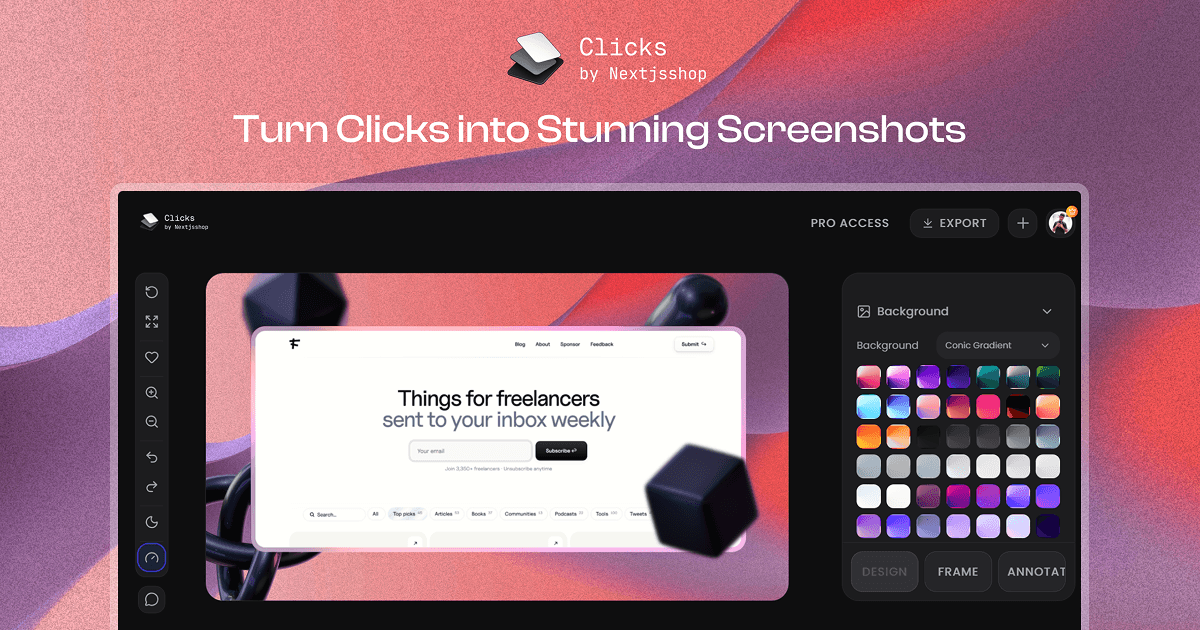
If you want to make your screenshots beautiful and change screenshot backgrounds online without a heavy design tool, Clicks by Nextjsshop gives you everything in one place.[web:12] You can upload any screenshot, place it on a modern background, add shadows, borders, and annotations, then export in high resolution for your website, social media, or product pages.
What Is a Screenshot Background Editor?
A screenshot background editor lets you take a raw UI or product screenshot and place it on a customized canvas with your own background, spacing, and visual style. Instead of a boring desktop capture, you get a clean, on‑brand image ready to use in marketing and product communication.
Clicks by Nextjsshop is built exactly for this: upload once, design multiple “beautiful screenshot” variations, and export at the quality you need.[web:12]
Why Change Your Screenshot Background?
Changing the background of your screenshots helps them look professional and focused. Plain desktop or browser backgrounds can distract from your product, while gradients, wallpapers, and subtle effects keep attention where it matters.
Some common reasons to use a screenshot background editor:
- Highlight your product UI in a landing page hero section.
- Create consistent social media assets across Instagram, X/Twitter, and LinkedIn.
- Design App Store or Play Store screenshots that match your brand colors.
- Build marketing decks and pitch presentations with polished visuals.
Background Options in ClicksbyNextjsshop
ClicksbyNextjsshop gives you multiple ways to design a beautiful screenshot background so you are not stuck with a single flat color.
Multiple Background Types
You can start by uploading your screenshot and then choosing one of several background types.
- Wallpapers – A curated collection of beautiful wallpapers ready to use.
- Conic Gradients – Modern radial‑style gradients for dynamic compositions.
- Linear Gradients – Smooth top‑to‑bottom or side‑to‑side gradients to match your brand.
- Custom Backgrounds – Upload your own background images, textures, or photos.
This makes it easy to go from “plain screenshot” to “designed visual” in a few clicks.
Exclusive Pro Background Packs
If you upgrade to Pro, you unlock additional ready‑made background content packs.
- Exclusive Background Pack – Extra curated wallpapers.
- Exclusive Cosmic Gradients – Gradient sets inspired by cosmic and neon themes.
- Exclusive Linear Gradients – Premium linear gradients tuned for product screenshots.
These packs save time when you want a beautiful result without manually designing a background from scratch.
Noise and Blur for Focused Backgrounds
A key part of a beautiful screenshot is guiding the viewer’s eye to the main UI. ClicksbyNextjsshop includes noise and blur controls that you can apply directly to the background.
- Noise effect adds subtle texture so the background feels less flat.
- Blur effect softens the background to push attention forward to the screenshot.
- You can combine both to get a cinematic or editorial look while keeping text and UI readable.
These effects are especially useful when you use a photo or complex image as a background and still want your product to stay in focus.
Layout, Canvas, and Aspect Ratios
A beautiful background works best when the composition is balanced, so ClicksbyNextjsshop gives you strong layout and canvas controls.
Aspect Ratio Presets
You can choose from ready‑made aspect ratios for almost every platform.
- Instagram Post (1:1)
- Instagram Story / Reels (9:16)
- X/Twitter Post (16:9)
- LinkedIn Post (1.91:1)
- YouTube Thumbnail (16:9)
- And many more daily‑use sizes.
With Pro, you can also define a custom aspect ratio, which is ideal for website hero sections, ad creatives, or specific platform requirements.
Layout Presets and Transform Controls
Once your canvas is set, you can position the screenshot exactly how you like.
- Layout presets: Centered, left‑aligned, right‑aligned, and grid layouts for multi‑image designs.
- Drag and drop: Move your screenshot anywhere on the canvas with real‑time preview.
- Zoom controls: Zoom in or out to fit the composition perfectly.
For even more control, advanced transforms are available:
- Translate X/Y – Pixel‑perfect horizontal and vertical movement.
- Scale – Resize proportionally without losing aspect ratio.
- Rotate X/Y/Z – Create 3D‑like rotations or subtle perspective.
- Skew X/Y – Add dynamic tilt for more energetic layouts.
These tools let you go from simple flat mockups to dynamic, modern product presentations.
Shadow, Border, and Radius Controls
The details are what actually make a screenshot look “beautiful”.
Shadow Effects
You can add depth and realism with shadows around your screenshot.
- Multiple shadow presets for different styles.
- Opacity control to go from soft to strong shadows.
- Underlay shadows behind the screenshot.
- Overlay shadows on top for unique creative effects.
- Custom shadow offset and blur for fine‑tuning.
Shadows help your screenshot feel like a real object sitting on the background instead of a flat pasted image.
Border Styles and Radius
ClicksbyNextjsshop also includes stylish border options that match modern UI and SaaS design.
- Glass Light – Light frosted glass effect.
- Glass Dark – Dark glass border for darker themes.
- Liquid Glass – More dynamic glass‑like styling.
- Classic Border – Simple solid border when you want clean lines.
Corner radius can be adjusted with:
- Sharp – Perfect, 90‑degree corners.
- Curved – Light rounding for subtle softness.
- Round – Fully rounded corners.
- Custom Radius – Exact pixel values per corner if needed.
With these combinations you can create card‑like screenshots that look right at home on modern landing pages.
Powerful Annotation System
Many users searching for beautiful screenshots and screenshot background editors also want to highlight specific parts of their UI. ClicksbyNextjsshop includes a full annotation system so you do not need a separate design app.
Built‑In Annotation Collections
There is a large library of ready‑made annotation elements you can drag directly onto your canvas.
- Tapes and torn paper
- Pixel emojis
- Scribbles and extra scribble variations
- Handwritten arrows
- 3D abstract shapes and 3D objects
- Background lines, geometric shapes
- Solid and outline icons
- Social icons, cursors, text hands, and more.
These elements help you explain features, call out metrics, or draw the viewer’s eye to important areas.
Annotation Controls and Custom Uploads
Every annotation has its own controls:
- Resize freely.
- Tilt / rotate on X, Y, and Z axis.
- Add blur when you want softer or background‑style annotations.
There is also a right‑click context menu that lets you bring elements forward or backward, duplicate, or delete. Pro users can even upload custom annotations such as logos, stickers, and brand graphics so every screenshot stays perfectly on‑brand.
Export in High Resolution
Once your background, layout, and annotations are ready, you can export the final image.
- Free users can export in 1K HD with unlimited exports.
- Pro users can export in multiple resolutions up to 10K, which is ideal for large website sections, print, and high‑density displays.
Supported formats include common image types like PNG, JPG, and WebP, with quality controls so you can balance file size and clarity.
Step‑By‑Step: How to Create a Beautiful Screenshot Background
Here is a simple workflow you can follow inside Clicks by Nextjsshop.[web:12]
-
Upload your screenshot
Drag and drop your product, dashboard, or app screenshot onto the canvas. -
Choose your aspect ratio
Select a preset for the target platform or define a custom ratio if you are using it on a landing page. -
Pick a background style
Try wallpapers, conic gradients, linear gradients, or upload your own brand image.
Add noise and blur to keep the focus on your product. -
Position and transform the screenshot
Use drag‑and‑drop, zoom, translate, scale, rotate, and skew to get a balanced composition. -
Add shadows, borders, and radius
Apply a glass or liquid border, tweak corner radius, and choose a shadow preset to add depth. -
Drop in annotations
Use arrows, scribbles, or branded icons to point at key features, numbers, or flows. -
Export your image
Export at 1K HD on free or up to 10K with Pro, then use the image on your website, app store listing, or social feed.
Who Is This Perfect For?
ClicksbyNextjsshop’s screenshot background editor is built for anyone who needs consistent, beautiful visuals.
- SaaS founders and marketers who want premium product shots without hiring a designer.
- E‑commerce brands creating product banners, ad creatives, and landing page sections.
- Indie hackers and makers sharing product updates on social media and communities.
- Designers and agencies who need a fast way to generate multiple screenshot variations for clients.
If you are already using Clicks by Nextjsshop as a Shots.so alternative, this background feature takes your product screenshots to a completely new level.[web:12]
Start Creating Beautiful Screenshot Backgrounds
With ClicksbyNextjsshop, you no longer need a complex design workflow just to make a single beautiful screenshot. Upload once, change the screenshot background as many times as you like, and export ready‑to‑publish images that look polished, consistent, and on‑brand.